Aug 30, 2026
The Brouwer-Lyddane elements are a set of "mean elements" used to describe the orbit of a spacecraft. Mean elements (as opposed to osculating elements) are used as a way to smooth out fluctuations of an orbit due to the zonal spherical harmonic terms. There are two flavors: short period (considering only J2) and long period (considering J2-J5). The equations were formulated in 1959 by Brouwer [1], and then improved in 1963 by Lyddane [2]. They have a long history of use in orbital mechanics.
Even though the earliest implementations of this method at NASA were in Fortran [3], I can't find any modern Fortran implementation of this algorithm. So, let's use our AI friend to create one! (see earlier post). Like last time, we will start with a C++ implementation from GMAT [4].
Input: reason, Output: pleasure
The result can be seen here.
This conversion process was very smooth compared to the last time I tried something like this. Maybe the AI is getting better, or this is a more straightforward algorithm (or a little bit of both). It basically got it right the first time. I ended up having to massage it a little bit to get it into the form I wanted. It created a bunch of unit tests that also allowed for identifying a minor issue or two in the original code. Some changes from the original code are listed here:
- The Fortran version has selectable real kind values (so you can use single, double, or quad precision).
- It now accepts the planetary body terms as inputs, rather than having them be hard coded. So, it could potentially work for non-Earth applications.
- There was a bug in the original code if the inclination was greater than 175 deg.
- There was a potential divide by zero issue in the original code that I also fixed (if the orbit eccentricity was exactly zero).
- One interesting thing is that the AI decided to replace the error reporting mechanism in the original code (some kind of message reporting system in GMAT) with integer output codes from all the routines. Originally it implemented this in a slightly odd way (where
stat was optional) but I just cleaned it up manually easily enough. Fortran does not yet have any kind of sane exception handling system, despite that being an oft-requested feature from users.
- The Fortran routines are
snake_case rather than the original CamelCase. The AI just decided that was the way to go.
The main routines convert to/from Cartesian and the two flavors of mean elements:
pure subroutine cartesian_to_brouwer_mean_short(mu, req, j2, cartesian, stat, blms)pure subroutine brouwer_mean_short_to_cartesian(mu, req, j2, blms, stat, cart)pure subroutine cartesian_to_brouwer_mean_long(mu, req, j2, j3, j4, j5, cartesian, stat, blml)pure subroutine brouwer_mean_long_to_cartesian(mu, req, j2, j3, j4, j5, blml, stat, cart)
The various unit tests perform singularity checks and round-trip type comparisons (where we start with a state in osculating orbital elements, then convert to Cartesian, then to mean elements, and then back to Cartesian, etc). These are all passing, which is a necessary but not really a sufficient condition for it all being correctly-implemented.
The code all seems to work pretty well. Is it all 100% correct? ¯\_(ツ)_/¯
Example
We can also perform a sanity check by propagating a state and visually comparing the osculating and mean elements.
This test case can be found in the git repo here.
Consider the following example LEO orbit state:
- Semimajor axis: 6800.0 km
- Eccentricity: 0.02 deg
- Inclination: 51.6 deg
- Right ascension of ascending node: 30 deg
- Argument of perigee: 40.0 deg
- True anomaly: 0.0 deg
Let's propagate this state at the Earth using the J2-J5 zonal harmonics. Inputs are:
- \(\mu\) = 398600.4415 (km\(^3\)/s\(^2\))
- \(r_{eq}\) = 6378.1363 (km)
- J2 = 1.082626925638815e-3
- J3 = -0.2532307818191774e-5
- J4 = -0.1620429990000000e-5
- J5 = -0.2270711043920343e-6
The equations of motion for this are given here:
subroutine gravity_j2_j3_j4_j5(r,mu,req,j2,j3,j4,j5,acc)

real(wp),dimension(3),intent(in)  :: r   !! satellite position vector [km]
real(wp),intent(in)               :: mu  !! central body gravitational parameter [km^3/s^2]
real(wp),intent(in)               :: req !! body equatorial radius [km]
real(wp),intent(in)               :: j2  !! j2 coefficient
real(wp),intent(in)               :: j3  !! j3 coefficient
real(wp),intent(in)               :: j4  !! j4 coefficient
real(wp),intent(in)               :: j5  !! j5 coefficient
real(wp),dimension(3),intent(out) :: acc !! gravity acceleration vector [km/s^2]

real(wp) :: rmag, r2, r3, z, z_r, z2_r2, z3_r3, z4_r4, &
            re_r, re_r2, re_r3, re_r4, re_r5, &
            f_r, f_z, mu_r3

r2 = dot_product(r, r)
rmag = sqrt(r2)
r3 = rmag * r2
z = r(3)
z_r = z / rmag
z2_r2 = z_r * z_r
z3_r3 = z2_r2 * z_r
z4_r4 = z2_r2 * z2_r2
re_r = req / rmag
re_r2 = re_r * re_r
re_r3 = re_r2 * re_r
re_r4 = re_r3 * re_r
re_r5 = re_r4 * re_r
mu_r3 = mu / r3

f_r = 1.0_wp + 1.5_wp * j2 * re_r2 * (1.0_wp - 5.0_wp * z2_r2) &
      + 2.5_wp * j3 * re_r3 * (3.0_wp * z_r - 7.0_wp * z3_r3) &
      - 0.625_wp * j4 * re_r4 * (3.0_wp - 42.0_wp * z2_r2 + 63.0_wp * z4_r4) &
      - 2.625_wp * j5 * re_r5 * (5.0_wp * z_r - 30.0_wp * z3_r3 + 33.0_wp * z4_r4 * z_r)

f_z = -3.0_wp * j2 * re_r2 * z_r &
      + 0.5_wp * j3 * re_r3 * (3.0_wp - 15.0_wp * z2_r2) &
      + 2.5_wp * j4 * re_r4 * (3.0_wp * z_r - 7.0_wp * z3_r3) &
      - 1.875_wp * j5 * re_r5 * (1.0_wp - 14.0_wp * z2_r2 + 21.0_wp * z4_r4)

acc = -mu_r3 * [r(1) * f_r, &
                r(2) * f_r, &
                (r(3) * f_r - rmag * f_z)]

end subroutine gravity_j2_j3_j4_j5
We can integrate this with any method we want, I'll use DDEABM (a variable step Adams method). Then, we use pyplot-fortran to make some plots.
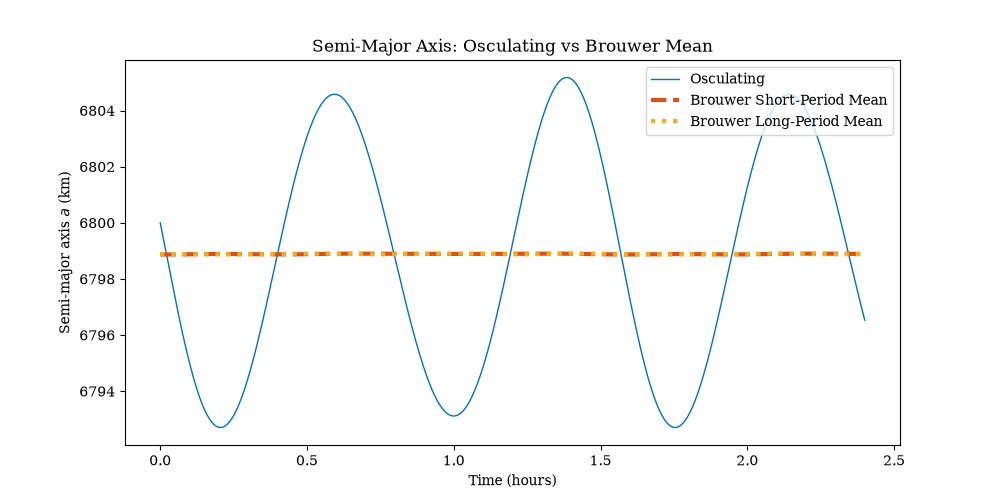
For the semimajor axis, we can clearly see how the mean element tracks the osculating one over time. In this case, there is not much difference between the short and long period mean:
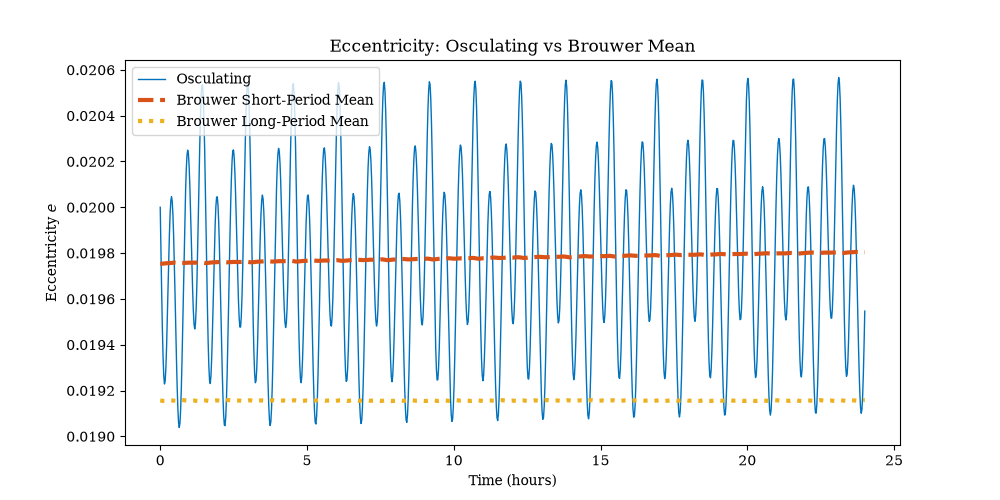
For eccentricity, it's a bit different. For a one-day propagation, the short-period mean tracks the eccentricity well, but the long-period one seems off:
But if we propagate longer, we can see how the long-period terms come into play:
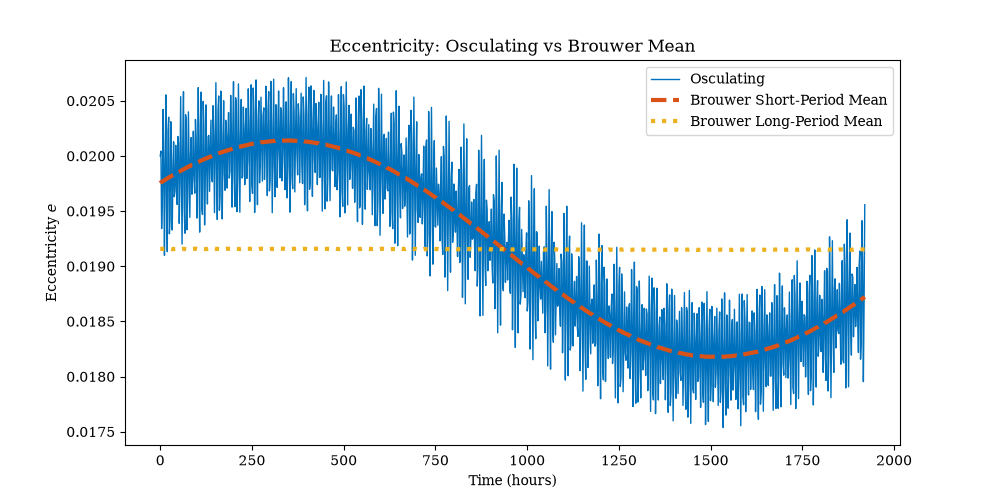
So, the results all look reasonable. To really validate this code, we'd need to (at a minimum) compare the outputs with the original code, but I haven't done that yet.
Summary
So, there you have it folks. Another somewhat-interesting AI-assisted conversion of an astrodynamics algorithm from C++ to Modern Fortran. The future is now, and we are all doomed!
Short biographies

Brouwer and Lyddane
Dirk Brower (1902-1966) was a Dutch-American astronomer/astrodynamicist, and professor at Yale University. He is the namesake of the Dirk Brouwer Award from the American Astronautical Society to honor significant technical contributions to space flight mechanics and astrodynamics.
Russell H. Lyddane (1913-2001), a somewhat less well-known personage, was an American born in Washington DC. He worked at the Naval Weapons Laboratory in Dahlgren, Virginia from 1941-1964 (he served as Technical Director from 1956-1964).
References
- Brouwer, D., "Solution of the Problem of Artificial Satellite Theory without Drag," Astronomical Journal, Vol. 64, Nov. 1959, pp. 378-397.
- Lyddane, R. H., "Small Eccentricities or Inclinations in the Brouwer Theory of the Artificial Satellite," Astronomical Journal, Vol. 68, Oct. 1963, pp. 555-558.
- E. A. Galbreath, "Brouwer-Lyddane Orbit Generator Routine", NASA GSFC, X-553-70-223, Sept. 1970. Note: there seems to be a version of this FORTRAN IV code given in an appendix of this NOAA document (Appendix F of the NOAA Polar Orbiter Data User's Guide, 1998-11-01).
- NASA General Mission Analysis Tool (GMAT). [see the file:
StateConversionUtil.cpp]
- Brouwer-Lyddane Mean [FreeFlyer documentation].
- J. Williams, Gooding Universal Elements, Oct 25, 2021 [degenerateconic.com]
May 25, 2026
"I am bound Upon a wheel of fire, that mine own tears Do scald like molten lead." - Shakespeare, "King Lear", Act IV, Scene 7
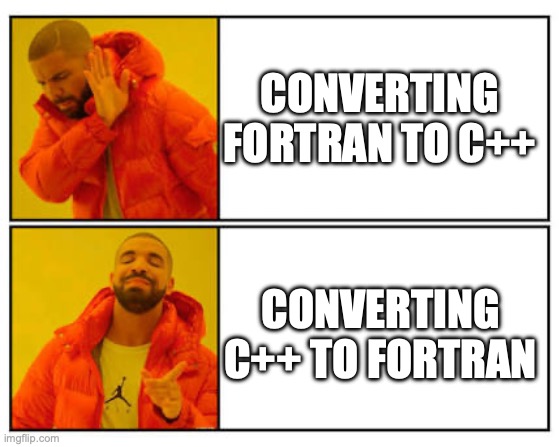
Typically, we see examples of poor saps who think that legacy Fortran codes must be converted to "modern" languages such as C++.
Well, let's try to do the reverse! Let's try converting some "legacy" C++ code to modern Fortran. The example I will show is the Jacchia-Roberts atmosphere model from GMAT (General Mission Analysis Tool). This model is widely used for satellite orbit simulations to model satellite drag. There is no modern Fortran implementation publicly available as far as I can tell, so let's create one.
And just to see what happens, I'll do this with assistance from AI, particularly Claude Sonnet (initially 4.5, but also trying 4.6) in GitHub Copilot. What could go wrong?
All About the Vibes
First, we start with the C++ files we want to convert. These files are at least 20 years old, with heritage going back even further. The main ones are:
- JacchiaRobertsAtmosphere.cpp - the main implementation of the Jacchia-Roberts density model.
- SolarFluxReader.cpp - the algorithm to read in a space weather file. There are a couple different file formats supported here, but I'm only going to worry about the CSSI one.
- A1Mjd.cpp - Some time conversion routines. This will be important later when trying to diagnose some validation issues.
Using AI is a very interesting and also frustrating experience.
It's like working with someone who is a genius, but is also an idiot and sometimes a compulsive liar.
The initial conversion got me 80% of the way there but was subtly wrong in various ways.
I started with a basic prompt ("Convert this C++ file into modern Fortran") and went from there.
There was a lot of back and forth and manual interventions to fix little issues (syntax errors, etc.)
In one instance, I tried to get it to identify the source of a bug, and it "thought" for 15 minutes until I finally just gave up and looked at the code myself and fixed it instantly.
Sometimes, it would get fixated on one approach that wasn't correct, and I'd have to keep telling it to ignore that approach and try something else (e.g., I had to figure out the correct way to do something, and once I gave it more directions, it was fine and could do it).
One thing that was annoying was that it kept trying to generate code from first principles rather than performing a straight up conversion of the C++ code to Fortran. I had to keep reminding it that what I wanted was a faithful translation.
At one point, I switched to Sonnet 4.6 and it also found a couple of code typos that Sonnet 4.5 had generated.
The Result
See jacchia-roberts-fortran for the end result. The library provides a class that can be used to initialize the model with a given space weather file (or constant values can be specified). Then a method is provided for computing the density.
An example use case is:
program example

use jacchia_roberts_module, only: jacchia_roberts_type
use jacchia_roberts_kinds,  only: ip, dp

implicit none

type(jacchia_roberts_type) :: jr
integer(ip) :: status
real(dp) :: density

! example inputs:
real(dp),parameter :: rad_earth = 6356.766_dp ! Earth polar radius (km)
character(len=*),parameter :: sw_file = 'data/SpaceWeather-All-v1.2.txt' ! space weather file to load
real(dp),parameter :: utc_mjd = 59215.5_dp ! MJD: Jan 1, 2021 12:00 UTC
real(dp),parameter :: alt_km = 200.0_dp ! geodetic altitude (km)
real(dp),parameter :: lat = 20.0_dp ! geodetic latitude (deg)
real(dp),dimension(3),parameter :: r = [7000.0_dp, 0.0_dp, 0.0_dp] ! spacecraft position vector (km)
real(dp),dimension(3),parameter :: sun = [1.0_dp, 0.0_dp, 0.0_dp] ! sun direction unit vector

! initialize the model:
call jr%initialize(rad_earth, filename=sw_file, status=status)

! compute the density:
density = jr%density(alt_km, r, sun_vector, lat, utc_mjd)

end program example
The idea is, first you would initialize the class, and then during your simulation, call the model to get the atmospheric density using the current epoch and state of the spacecraft. A flow chart of the process would look a little like this:

The resultant Fortran code is very clean compared to the C++ code. Consider this example (the rho_cor function). The original C++ code:
Real JacchiaRobertsAtmosphere::rho_cor(Real height, Real a1_time, Real geo_lat,
                                       GEOPARMS *geo)
{
   Real geo_cor, semian_cor, slat_cor, f, g, day_58, tausa, alpha;
   Real sin_lat, eta_lat;

   // Compute geomagnetic activity correction
   if (height < 200.0)
   {
      geo_cor = 0.012 * geo->tkp + 0.000012 * exp(geo->tkp);
   }
   else
   {
      geo_cor = 0.0;
   }

   // Compute semiannual variation correction
   f = (5.876e-7 * pow(height, 2.331) + 0.06328) *
      exp(-0.002868 * height);
   day_58 = (a1_time - 6204.5)/365.2422; // @todo - should this use GmatConstants value?
   tausa = day_58 + 0.09544 * (
         pow( 0.5*(1.0 + sin(2*GmatMathConstants::PI*day_58 +6.035)), 1.65 )  - 0.5);
   alpha = sin(4.0*GmatMathConstants::PI*tausa + 4.259);
   g = 0.02835 + (0.3817 + 0.17829 * sin(2*GmatMathConstants::PI*tausa + 4.137)) *
         alpha;
   semian_cor = f * g;

   // Compute seasonal latitudinal variation
   sin_lat = sin(geo_lat);
   eta_lat = sin(2.0*GmatMathConstants::PI*day_58 + 1.72) * sin_lat * fabs(sin_lat);
   slat_cor = 0.014 * (height - 90.0) * eta_lat *
      exp(-0.0013 * (height - 90.0) * (height - 90.0));

   return pow(10.0, geo_cor + semian_cor + slat_cor);
}
And the Fortran equivalent:
pure function rho_cor(height, utc_mjd, geo_lat, geo) result(correction)
    real(dp), intent(in) :: height !! Spacecraft altitude (km)
    real(dp), intent(in) :: utc_mjd !! UTC Modified Julian Date
    real(dp), intent(in) :: geo_lat !! Geodetic latitude of spacecraft (radians)
    type(geoparms_type), intent(in) :: geo !! Geomagnetic parameters
    real(dp) :: correction !! Correction factor (multiplicative)

    real(dp) :: geo_cor, semian_cor, slat_cor, f, g, day_58, tausa, alpha, sin_lat, eta_lat

    ! Compute geomagnetic activity correction
    if (height < 200.0_dp) then
        geo_cor = 0.012_dp * geo%tkp + 0.000012_dp * exp(geo%tkp)
    else
        geo_cor = 0.0_dp
    end if

    ! Compute semiannual variation correction
    f      = (5.876e-7_dp * height**2.331_dp + 0.06328_dp) * exp(-0.002868_dp * height)
    day_58 = (utc_mjd - 36204.0_dp) / 365.2422_dp ! years since Jan 1, 1958 midnight
    tausa  = day_58 + 0.09544_dp * &
            ((0.5_dp * (1.0_dp + sin(2.0_dp * PI * day_58 + 6.035_dp)))**1.65_dp - 0.5_dp)
    alpha  = sin(4.0_dp * PI * tausa + 4.259_dp)
    g      = 0.02835_dp + (0.3817_dp + 0.17829_dp * sin(2.0_dp * PI * tausa + 4.137_dp)) * alpha
    semian_cor = f * g

    ! Compute seasonal latitudinal variation
    sin_lat  = sin(geo_lat)
    eta_lat  = sin(2.0_dp * PI * day_58 + 1.72_dp) * sin_lat * abs(sin_lat)
    slat_cor = 0.014_dp * (height - 90.0_dp) * eta_lat * &
                exp(-0.0013_dp * (height - 90.0_dp)**2)

    correction = 10.0_dp**(geo_cor + semian_cor + slat_cor)

end function rho_cor
The main differences in the Fortran are:
- The
real kinds use the dp kind variable, allowing us to easily compile the code with a specified real kind (e.g., single, double, or quad precision). This is one of the neat features of Fortran, and how I write all my codes.
- The crazy GSFC MJD (
a1_time) is replaced with real MJD, so we had to modify that one constant (the epoch of Jan 1, 1958).
- Normal syntactical differences:
abs instead of fabs, no semicolons, ** operator instead of the pow function, then/endif instead of {} symbols, etc. The C++ code using (height - 90.0) * (height - 90.0) instead of (height - 90.0_dp)**2 is also kind of funny.
I find the Fortran version easier to read without the extra C++ clutter, but maybe it's just because i'm more used to it? This aspect of Fortran (it being easy to read) isn't always appreciated or discussed in these "language war" type discussions, but it's very real in my opinion, especially for code is that mostly math.
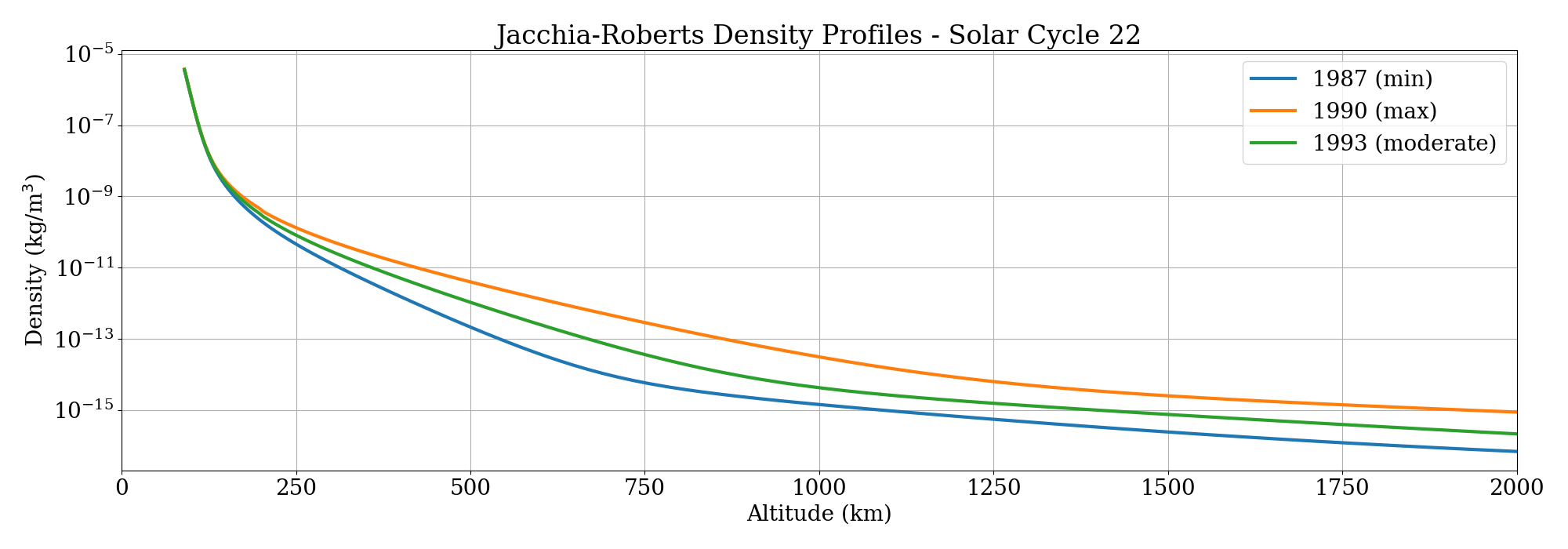
Here's an example output density plot (generated using my pyplot-fortran library) for three epochs near the max/min/average parts of the solar cycle:
Validation
One of the most interesting parts of the process was using AI to help validate the result.
I had no unit tests to start with, but I had two sources of "truth":
- GMAT itself, which I could run to generate density data for different altitudes, epochs, etc. and compare it to the Fortran results.
- An older Fortran implementation of Jacchia-Roberts. This was a Fortran 77 implementation by Valdemir Carrara (Instituto Nacional de Pesquisas Espaciais, INPE) from the 80s, which I obtained from his website, which is no longer there (I archived the codes on GitHub in 2019 thinking I would do something with them one day, and now that day has arrived).
This was also another AI opportunity, since the space weather component of this code was not preserved, so I had Copilot generate a wrapper so that it could call the modern Fortran module we had produced instead.
AI seems to get "unit test happy" sometimes, spewing out numerous long unit tests that do something simple and then prints up elaborate tables with unicode icons and paragraphs of text that tells you what it just tested. That seemed a bit excessive, and I ended up deleting many of the tests it generated, but kept a good number of them. Overall it was quite useful for helping to generate and evaluate tests. When tests failed (e.g., the new results didn't match the other two data sets) I would tell it to investigate to locate the source of the discrepancy, which it could sometimes do successfully, and sometimes not.
The AI went on a flight of fancy for a while trying to figure out a timing discrepancy. It did help me debug it, but it couldn't quite figure it out. At one point I asked if it could go to GitHub and look at the full GMAT code that was there, it told me it could and provided an unconvincing reply suspiciously quickly that it had done so. I guess it was lying to me (Copilot I thought we were friends). I ended up downloading the extra file manually, putting it in the workspace, and directing the AI's attention to it, which seemed to help.
During the validation process, the AI did help me identify three possible issues with the original C++ code. I link the three bug reports I submitted here:
- PrepareKpData uses wrong row index for F10.7a - This is one that the AI detected that I would never have noticed in a million years. It looks like a copy/paste type bug but I'm not 100% sure if it's a real issue or not.
- Legacy UTC calculation used by JacchiaRobertsAtmosphere - This is one that I eventually noticed while trying to debug timing discrepancies during the validation process comparing the results from GMAT to the new version. GMAT (and other GSFC tools) use this crazy alternate definition of modified Julian date (MJD).
So while trying to figure out how to convert what it was outputting in a real MJD, I realized they were using an approximation of UTC (it turns out the correct UTC value output from GMAT is slightly different from what is being used internally by the atmosphere model).
It looks like something that was a holdover from the earlier tools, but I'm not sure if there's a good reason to keep using it.
According to the git history when this file was first committed, the file was originally created for the GSS project in 1995 (I presume this is referring to the Generalized Support Software project at GSFC).
- Low-altitude Jacchia-Roberts bugs - This one is very interesting. There appear to be bugs in the GMAT code for low (<125 km) altitudes. Note that this part of the code is there but not used, since an exception is raised for this case, even though the Jacchia model should support the low altitude ranges (in Roberts' paper, he says his results "are identical" to Jacchia's original equations in the 90 - 125 km altitude regime).
According to the comments and git history on SourceForge, this file was committed in 2004 and the source was the Windows Swingby code (Swingby was another legacy NASA tool that was one of the progenitors of STK/Astrogator).
The
roots function comments says it was converted from existing Fortran code (likely from GTDS, which included the Jacchia-Roberts model).
However, the polynomial deflation technique was written in 1993 based on the "Numerical Recipes in C" book (note that Numerical Recipes talks about the need to "polish" a root found by this method, something not implemented in this code. Maybe that's where they went wrong?)
Is it possible that Swingby had this same bug all those years ago? Or maybe my Fortran conversion is the buggy one? In any event, I replaced this algorithm in the Fortran version with an alternate root finding approach (based on the one in the INPE code) which seems to work fine. I also tested routines from polyroots-fortran and those gave the same results (I might end up just replacing this custom routine with the external dependency).
Legacy Schmegacy

The earlier Fortran tool that some of this code was based on was the Goddard Trajectory Determination System (GTDS). This tool, like many Fortran tools, had a long heritage, but was thrown in the trash in the end, never modernized but replaced with C++ rewrites.
Incidentally, GTDS and Swingby were developed by Computer Sciences Corporation (CSC), a company that existed from 1959 to 2017, which was cofounded by Roy Nutt, one of the members of the original team that created Fortran.
So, now we have come full circle on this wheel of fire with a new modern Fortran port.
Conclusions
The end result of our AI-assisted C++ to Fortran conversion produced something that I think is likely quite useable.
Overall I believe it did save me time compared to how long it would have taken me to do manually. But, getting this over the finish line definitely required manual intervention and domain knowledge.
The process found a few potential bugs in the original code that need to be looked at by actual experts, since I don't trust the AI not a gaslight me with plausible-sounding reasons for them.
Having the AI write the unit tests was also a huge time saver and help with debugging the implementation.
In the end, for a task of this magnitude, I think AI can get you something like 95% of the way there, but then that last 5% needs to be completed and checked very carefully by somebody who more or less knows what they are doing.
Blindly "vibe coding" is dangerous for technical applications such as this, since it's very easy for an AI to provide plausible looking procedures that are totally (or even worse, subtly) wrong.
Note: No AI was used to write the text of this article.
References
- Jacchia, L. G., "New Static Models of the Thermosphere and Exosphere with Empirical Temperature Profiles", Smithsonian Astrophysical Observatory Special Report No. 313, 1970.
- Roberts, C. E., Jr., "An Analytic Model for Upper Atmosphere Densities Based Upon Jacchia's 1970 Models", Celestial Mechanics, Vol. 4, pp. 368-377, 1971.
- GMAT: General Mission Analysis Tool
- Archive of legacy INPE atmosphere models github/@jacobwilliams
- Atmosphere Models [degenerateconic.com] 2021-10-24
- "Does the Programming Language Still Matter When AI Writes Your Code? I Tried Python and Came Back to C#" medium.com/@binnmti, Mar 16, 2026.
- J. Carrico & E. Fletcher, "Software Architecture and Use of Satellite Tool Kit’s Astrogator Module for Libration Point Orbit Missions", Libration Point Orbits and Applications, pp. 471-487 (2003)
- A. C. Long, et al., "Goddard Trajectory Determination System (GTDS) Mathematical Theory Revision 1", FDD/552-89/001, Computer Sciences Corporation, July 1989.
Feb 10, 2018
It looks like the Fortran community has lost another venerable NASA Fortran library to C++. I recently noticed that the latest release of NASA's Global Reference Atmosphere Model (GRAM) is now C++. From the release link:
Earth-GRAM 2016 is now available as an open-source C++ computer code that can run on a variety of platforms including PCs and UNIX stations. The software provides a model that offers values for atmospheric parameters such as density, temperature, winds, and constituents for any month and at any altitude and location within the Earth's atmosphere. Earth-GRAM 2010 is available in FORTRAN. Similar computer models of Mars, Venus, Titan, and Neptune are available for diverse mission applications through NASA’s Space Environments and Effects (SEE) Program, a partnership with industry, academia, and other government agencies that seeks to develop more reliable, more effective spacecraft.

The Earth-GRAM model, originally written in Fortran 77, is produced by MSFC and has been around for a while, with many revisions (i.e., GRAM-86, GRAM-88, GRAM-90, GRAM-95, GRAM-99, GRAM 2007, and GRAM 2010). In the 2010 revision, they converted the old Fortran 77 code to Fortran 90, which I thought was a step in the right direction (although maybe 20 years too late). It seems like they could have used Fortran 2003 and provided a C interface using the standard Fortran/C Interoperability feature, which would have enabled calling it from a variety of languages (including C++).
I remain utterly unconvinced that C++ is the programming language that engineers and scientists should be using. Are CS people taking over programming jobs once done by engineers? Is this a failure of university engineering departments? Although it seems like even CS people don't want to be using C++ anymore. Every time I turn around a new programming language (Java, Rust, Go, D, C#, Swift, ...) is created by CS people fed up with the C++ dumpster fire. So I don't know who is telling engineers that C++ is the future. And the perception that Fortran is an obsolete programming language is very strong, even within the engineering/technical disciplines that it was designed for. Sometimes this is due to sheer ignorance, but sometimes it is due to ancient Fortran 77 legacy code that people have to deal with. I sympathize with them, Fortran 77 code is terrible and needs to go away, but it should be modernized, not thrown out and replaced with C++. Think of the children! (and the memory leaks!)
Parting words of wisdom
Security tips when programming in C (2017 edition):
1) Stop typing
2) Delete what you've already typed
— ryan huber (@ryanhuber) June 21, 2017
See also
- Earth-GRAM 2016 is now available!
- Earth Global Reference Atmospheric Model (Earth-GRAM 2010) -- The last Fortran 90 release. [request here]
- F.W. Leslie, C.G. Justus, "The NASA Marshall Space Flight Center Earth Global Reference Atmospheric Model—2010 Version", NASA/TM—2011–216467, 2011
- ModelWeb Catalogue and Archive -- other atmosphere models listed on GSFC ModelWeb
- D. L. Johnson, R. Blocker, C. G. Justus, Global Reference Atmosphere Model (GRAM), NASA Tech Brief, MFS-28397, Jan 01, 1993
Dec 10, 2017

The upcoming Fortran standard formerly known as Fortran 2015 has a new name: Fortran 2018. It was decided to change it in order to match the expected year of publication. This makes sense. The previous standard (Fortran 2008) was published in 2010.
Waiting for an updated Fortran standard is an exercise in Zen-like patience. Almost a decade after Fortran 2008, we'll get a fairly minor update to the core language. And it will be years after that before it's fully supported by any compiler that most users will have available (gfortran still doesn't have a bug-free implementation of all of Fortran 2008 or even 2003). Fortran was essentially reborn in the Fortran 2003 standard, which was an amazing update that brought Fortran into the modern world. It's a terrific programming language for scientific and technical computing. However, the limitations are all too clear and have been for a long time:
- We need better facilities for generic programming. It's impossible to do some things without having to duplicate code or use "tricks" like preprocessing or include files (see JSON-Fortran for examples).
- We need some kind of exception handling. Fortran does have a floating-point exception handling feature, but honestly, it's somewhat half-baked.
- We need a better implementation of strings. Allocatable strings (introduced in Fortran 2003) are great, but not enough, since they can't be used in all instances where strings are needed.
- We need the language to be generally less verbose. I'm tired to having to type multiple nested SELECT TYPE statements to do something that is a one liner in Python (sure I know Fortran will never be as succinct as Python, but some of the verbosity required for object-oriented Fortran is just perverse).
- We need any number of new features to make it easier to extend the language with third-party libraries (so we don't have to wait two decades for a feature we want).
- We also need the language development process to embrace a more open collaborative model using modern tools (Usenet is not the future). I guess the recent survey was unprecedented, but it's not enough.
Fortran is a programming language that needs a better PR department. Legacy Fortran codes are being rewritten in C++, Python, or even Julia. NASA frequently throws massive Fortran 77 libraries with decades of heritage (e.g., DPTRAJ/ODP, GTDS, SPICELIB) into the trash in order to rewrite it all from the ground up in C++, without ever considering Fortran 2003+ (or maybe not realizing it exists?). The information about modern Fortran on the internet is spotty at best, outdated, or downright wrong (what is the deal with REAL*8?). In popular consciousness Fortran is mostly a punchline (usually something to do with punchcards and your granddad). A language like Python (which was never designed for technical computing) is now seen by many as a superior solution for technical computing. Matlab refers to itself as "the only top programming language dedicated to mathematical and technical computing"! The Julia website lists somewhat misleading benchmarks than implies that C, Julia, and even Lua are faster than Fortran.
Now, get off my lawn, you kids!

See also
Aug 11, 2017

JPL recently released an update to their awesome SPICE Toolkit (it is now at version N66). The major new feature in this release is the Digital Shape Kernel (DSK) capability to define the shapes of bodies (such as asteroids) via tessellated plate models.
Unfortunately for Fortran users, they also announced that they have decided to reimplement the entire library in C++. SPICELIB is currently written in Fortran 77, which they f2c to provide a C version (which is also callable from IDL, Matlab, and Python, among others). Their reason for this "upgrade" is to provide thread safety and object oriented features. Of course, modern Fortran can be thread safe and object oriented, and upgrading the code to modern standards could be done in a fraction of the time it will take to rewrite everything from scratch in C++. SPICELIB is extremely well-written Fortran 77 code, and is not infested with COMMON blocks, EQUIVALENCE statements, etc. I actually don't think it would take much effort to modernize it. In addition, Fortran/C interoperability could be employed to easily provide an interface that is callable from C without source transformation.
However, I guess it isn't meant to be, and the science/engineering community will lose another Fortran code to C++ like many times before, in spite of C++ being a terrible language for scientists and engineers.
See also
Oct 29, 2016
For a number of years I have been familiar with the observation that the quality of programmers is a decreasing function of the density of go to statements in the programs they produce. -- Edsger W. Dijkstra
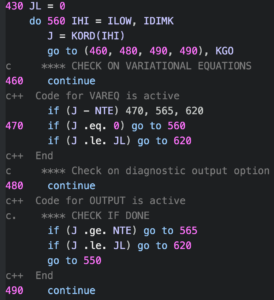
One of the classics of computer science is Edsger Dijkstra's "Go To Statement Considered Harmful", written in 1968. This missive argued that the GOTO statement (present in several languages at the time, including Fortran) was too primitive for high-level programming languages, and should be avoided.
Most people now agree with this, although some even today think that GOTOs are fine under some circumstances. They are present in C and C++, and are apparently used extensively in the Linux kernel. A recent study of C code in GitHub concluded that GOTO use is not that bad and is mainly used for error-handling and cleanup tasks, for situations where there are no better alternatives in C. However, C being a low-level language, we should not expect much from it. For modern Fortran users however, there are better ways to do these things. For example, unlike in C, breaking out of multiple loops is possible without GOTOs by using named DO loops with an EXIT statement like so:
a_loop : do a=1,n
    b_loop: do b=1,m
        !do some stuff ...
        if (done) exit a_loop ! break out of the outer loop
        !...
    end do b_loop
end do a_loop
In old-school Fortran (or C) this would be something like this:
do a=1,n
    do b=1,m
        ! do some stuff ...
        if (done) goto 10 ! break out of the outer loop
        ! ...
    end do
end do
10 continue
Of course, these two simple examples are both functionally equivalent, but the first one uses a much more structured approach. It's also a lot easier to follow what is going on. Once a line number is declared, there's nothing to stop a GOTO statement from anywhere in the code from jumping there (see spaghetti code). In my view, it's best to avoid this possibility entirely. In modern Fortran, DO loops (with CYCLE and EXIT), SELECT CASE statements, and other language constructs have obviated the need for GOTO for quite some time. Fortran 2008 added the BLOCK construct which was probably the final nail in the GOTO coffin, since it allows for the most common use cases (exception handing and cleanup) to be easily done without GOTOs. For example, in this code snippet, the main algorithm is contained within a BLOCK, and the exception handling code is outside:
main: block
    ! do some stuff ...
    if (error) exit main ! if there is a problem anywhere in this block,
    ! then exit to the exception handling code.
    ! ...
    return ! if everything is OK, then return
end block main

! exception handling code here
The cleanup case is similar (which is code that is always called):
main: block
    ! do some stuff ...
    if (need_to_cleanup) exit main ! for cleanup
    ! ...
end block main

! cleanup code here
I don't believe any of the new programming languages that have cropped up in the past couple of decades has included a GOTO statement (although someone did create a goto statement for Python as an April Fool's joke in 2004). Of course, the presence of GOTO's doesn't mean the programmer is bad or that the code isn't going to work well. There is a ton of legacy Fortran 77 code out there that is rock solid, but unfortunately littered with GOTOs. An example is the DIVA integrator from the JPL MATH77 library (the screenshot above is from this code). First written in 1987, it is code of the highest quality, and has been used for decades in many spacecraft applications. However, it is also spaghetti code of the highest order, and seems like it would be unimaginably hard to maintain or modify at this point.
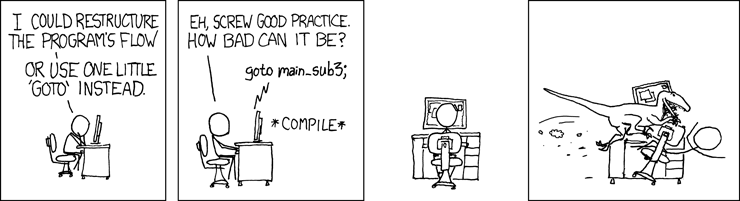
Source: XKCD
See also
- E. W. Dijkstra, "Go To Statement Considered Harmful", Communications of the ACM, Vol. 11, No. 3, March 1968, pp. 147-148 [online version here]
- E. A. Meyer, "Considered Harmful" Essays Considered Harmful, December 28, 2002.
- M. Nagappan, et. al, "An Empirical Study of Goto in C Code from GitHub Repositories", Proceedings of the 2015 10th Joint Meeting on Foundations of Software Engineering, Pages 404-414
- Using GOTO in Linux Kernel Code, January 13, 2003,
Apr 24, 2016

Here's another example using the C interoperability features of modern Fortran. First introduced in Fortran 2003, this allows for easily calling C routines from Fortran (and vice versa) in a standard and portable way. Further interoperability features will also be added in the next edition of the standard.
For a Fortran user, strings in C are pretty awful (like most things in C). This example shows how to call a C function that returns a string (in this case, the dlerror function).
module get_error_module

use, intrinsic :: iso_c_binding

implicit none

private

public :: get_error

interface
    !interfaces to C functions
    function dlerror() result(error) &
    bind(C, name='dlerror')
    import
    type(c_ptr) :: error
    end function dlerror

    function strlen(str) result(isize) &
    bind(C, name='strlen')
    import
    type(c_ptr),value :: str
    integer(c_int) :: isize
    end function strlen
end interface

contains

function get_error() result(error_message)
!! wrapper to C function char *dlerror(void);

character(len=:),allocatable :: error_message

type(c_ptr) :: cstr
integer(c_int) :: n

cstr = dlerror() ! pointer to C string

if (c_associated(cstr)) then

    n = strlen(cstr) ! get string length

    block
        !convert the C string to a Fortran string
        character(kind=c_char,len=n+1),pointer :: s
        call c_f_pointer(cptr=cstr,fptr=s)
        error_message = s(1:n)
        nullify(s)
    end block

else
    error_message = ''
end if

end function get_error

end module get_error_module
First we define the bindings to two C routines so that we can call them from Fortran. This is done using the INTERFACE block. The main one is the dlerror function itself, and we will also use the C strlen function for getting the length of a C string. The bind(C) attribute indicates that they are C functions. The get_error function first calls dlerror, which returns a variable of type(c_ptr), which is a C pointer. We use c_f_pointer to cast the C pointer into a Fortran character string (a CHARACTER pointer variable with the same length). Note that, after we know the string length, the block construct allows us to declare a new variable s of the length we need (this is a Fortran 2008 feature). Then we can use it like any other Fortran string (in this case, we assign it to error_message, the deferred-length string returned by the function).
Of course, Fortran strings are way easier to deal with, especially deferred-length (allocatable) strings, and don't require screwing around with pointers or '\0' characters. A few examples are given below:
subroutine string_examples()

implicit none

!declare some strings:
character(len=:),allocatable :: s1,s2

!string assignment:
s1 = 'hello world' !set the string value
s2 = s1 !set one string equal to another

!string slice:
s1 = s1(1:5) !now, s1 is 'hello'

!string concatenation:
s2 = s1//' '//s1 ! now, s2 is 'hello hello'

!string length:
write(*,*) len(s2) ! print length of s2 (which is now 11)

!and there are no memory leaks,
!since the allocatables are automatically
!deallocated when they go out of scope.

end subroutine string_examples
See also
Apr 09, 2016
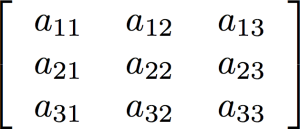
Built-in high-level support for arrays (vectors and matrices) using a very clean syntax is one of the areas where Fortran really shines as a programming language for engineering and scientific simulations. As an example, consider matrix multiplication. Say we have an M x K matrix A, a K x N matrix B, and we want to multiply them to get the M x N matrix AB. Here's the code to do this in Fortran:
Now, here's how to do the same thing in C or C++ (without resorting to library calls) [1]:
for (int i = 0; i < M; i++) {
    for (int j = 0; j < N; j++) {
        AB[i][j]=0;
        for (int k = 0; k < K; k++) {
            AB[i][j] += A[i][k] * B[k][j];
        }
    }
}
MATMUL is, of course, Fortran's built-in matrix multiplication function. It was added to the language as part of the Fortran 90/95 standards which dramatically upgraded the language's array-handling facilities. Later standards also added additional array features, and Fortran currently contains a wide range of intrinsic array functions:
| Routine |
Description |
| ALL |
True if all values are true |
| ALLOCATED |
Array allocation status |
| ANY |
True if any value is true |
| COUNT |
Number of true elements in an array |
| CSHIFT |
Circular shift |
| DOT_PRODUCT |
Dot product of two rank-one arrays |
| EOSHIFT |
End-off shift |
| FINDLOC |
Location of a specified value |
| IPARITY |
Exclusive or of array elements |
| IS_CONTIGUOUS |
Test contiguity of an array |
| LBOUND |
Lower dimension bounds of an array |
| MATMUL |
Matrix multiplication |
| MAXLOC |
Location of a maximum value in an array |
| MAXVAL |
Maximum value in an array |
| MERGE |
Merge under mask |
| MINLOC |
Location of a minimum value in an array |
| MINVAL |
Minimum value in an array |
| NORM2 |
L2 norm of an array |
| PACK |
Pack an array into an array of rank one under a mask |
| PARITY |
True if number of elements in odd |
| PRODUCT |
Product of array elements |
| RESHAPE |
Reshape an array |
| SHAPE |
Shape of an array or scalar |
| SIZE |
Total number of elements in an array |
| SPREAD |
Replicates array by adding a dimension |
| SUM |
Sum of array elements |
| TRANSPOSE |
Transpose of an array of rank two |
| UBOUND |
Upper dimension bounds of an array |
| UNPACK |
Unpack an array of rank one into an array under a mask |
As an example, here is how to sum all the positive values in a matrix:
In addition to the array-handling functions, we can also use various other language features to make it easier to work with arrays. For example, say we wanted to convert all the negative elements of a matrix to zero:
Or, say we want to compute the dot product of the 1st and 3rd columns of a matrix:
d = dot_product(A(:,1),A(:,3))
Or, replace every element of a matrix with its sin():
That last one is an example of an intrinsic ELEMENTAL function, which is one that can operate on scalars or arrays of any rank. The assignment is done for each element of the array (and can potentially be vectored by the compiler). We can create our own ELEMENTAL functions like so:
elemental function cubic(a,b,c) result(d)
real(wp),intent(in) :: a,b,c
real(wp) :: d
d = a + b**2 + c**3
end function cubic
Note that the inputs and output of this function are scalars. However, since it is ELEMENTAL, it can also be used for arrays like so:
real(wp) :: aa,bb,cc,dd
real(wp),dimension(10,10,10) :: a,b,c,d
!...
dd = cubic(aa,bb,cc) ! works on these
d = cubic(a,b,c) ! also works on these
The array-handling features of Fortran make scientific and engineering programming simpler and less error prone, since the code can be closer to the mathematical expressions, as well as making vectorization by the compiler easier [2]. Here is an example from the Fortran Astrodynamics Toolkit, a vector projection function:
pure function vector_projection(a,b) result(c)

implicit none

real(wp),dimension(:),intent(in) :: a
!! the original vector
real(wp),dimension(size(a)),intent(in) :: b
!! the vector to project on to
real(wp),dimension(size(a)) :: c
!! the projection of a onto b

if (all(a==0.0_wp)) then
    c = 0.0_wp
else
    c = a * dot_product(a,b) / dot_product(a,a)
end if

end function vector_projection
Line 15 is the vector projection formula, written very close to the mathematical notation. The function also works for any size vector. A similar function in C++ would be something like this:
inline std::array<double,3>
vector_projection(const std::array<double,3>& a,
const std::array<double,3>& b)
{
    if (a[0]==0.0 & a[1]==0.0 & a[2]==0.0){
        std::array<double,3> p = {0.0, 0.0, 0.0};
        return p;
    }
    else{
        double aa = a[0]*a[0]+a[1]*a[1]+a[2]*a[2];
        double ab = a[0]*b[0]+a[1]*b[1]+a[2]*b[2];
        double abaa = ab / aa;
        std::array<double,3>
        p = {a[0]*abaa,a[1]*abaa,a[2]*abaa};
        return p;
    }
}
Of course, like anything, there are many other ways to do this in C++ (I'm using C++11 standard library arrays just for fun). Note that the above function only works for vectors with 3 elements. It's left as an exercise for the reader to write one that works for any size vectors like the Fortran one (full disclosure: I mainly just Stack Overflow my way through writing C++ code!) C++'s version of dot_product seems to have a lot more inputs for you to figure out though:
double ab = std::inner_product(a.begin(),a.end(),b.begin(),0.0);
In any event, any sane person using C++ for scientific and engineering work should be using a third-party array library, of which there are many (e.g., Boost, EIGEN, Armadillo, Blitz++), rather than rolling your own like we do at NASA.
References
- Walkthrough: Matrix Multiplication [MSDN]
- M. Metcalf, The Seven Ages of Fortran, Journal of Computer Science and Technology, Vol. 11 No. 1, April 2011.
- My Corner of the World: C++ vs Fortran, September 07, 2011
Apr 03, 2016
Here is some C++ code (from actual NASA software):
aTilde[ 0] = aTilde[ 1] = aTilde[ 2] =
aTilde[ 3] = aTilde[ 4] = aTilde[ 5] =
aTilde[ 6] = aTilde[ 7] = aTilde[ 8] =
aTilde[ 9] = aTilde[10] = aTilde[11] =
aTilde[12] = aTilde[13] = aTilde[14] =
aTilde[15] = aTilde[16] = aTilde[17] =
aTilde[18] = aTilde[19] = aTilde[20] =
aTilde[21] = aTilde[22] = aTilde[23] =
aTilde[24] = aTilde[25] = aTilde[26] =
aTilde[27] = aTilde[28] = aTilde[29] =
aTilde[30] = aTilde[31] = aTilde[32] =
aTilde[33] = aTilde[34] = aTilde[35] = 0.0;
Here is the same code translated to Fortran:
😀
References
Jul 17, 2015
It looks like JPL just opensourced their MATH77 Fortran library. MATH77 is a library of Fortran 77 subroutines implementing various numerical algorithms. It was developed over decades at JPL, and contains some very high-quality and time-tested code. The code is released under a BSD-type license. There is also a C version for people who love semicolons.
See also
- "MATH77/mathc90 Libraries Available at netlib", July 17, 2015. [comp.lang.fortran]
