Mar 11, 2017
Binary search is a search algorithm that finds the position of a target value within a sorted array. The following binary search routine is taken from NASTRAN, a venerable finite element analysis program from NASA:
    SUBROUTINE BISLOC (*,ID,ARR,LEN,KN,JLOC)
C-----
C BINARY SEARCH - LOCATE KEY WORD 'ID' IN ARRAY 'ARR', 1ST ENTRY
C IF FOUND, 'JLOC' IS THE MATCHED POSITION IN 'ARR'
C IF NOT FOUND, NON-STANDARD RETURN
C I.E.
C ID = KEY WORD TO MATCH IN ARR. MATCH AGAINST 1ST COL OF ARR
C ARR = ARRAY TO SEARCH. ARR(ROW,COL)
C LEN = LENGTH OF EACH ENTRY IN ARRAY. LEN=ROW
C KN = NUMBER OF ENTRIES IN THE ARR. KN =COL
C JLOC= POINTER RETURNED - FIRST WORD OF ENTRY. MATCHED ROW
C-----
C
    INTEGER ARR(1)
    DATA ISWTCH / 16 /
C
    JJ = LEN - 1
    IF (KN .LT. ISWTCH) GO TO 120
    KLO = 1
    KHI = KN
10  K = (KLO+KHI+1)/2
20  J = K*LEN - JJ
    IF (ID-ARR(J)) 30,90,40
30  KHI = K
    GO TO 50
40  KLO = K
50  IF (KHI-KLO -1) 100,60,10
60  IF (K .EQ. KLO) GO TO 70
    K = KLO
    GO TO 80
70  K = KHI
80  KLO = KHI
    GO TO 20
90  JLOC = J
    RETURN
100 JLOC = KHI*LEN - JJ
    J = KN *LEN - JJ
    IF (ID .GT.ARR(J)) JLOC = JLOC + LEN
110 RETURN 1
C
C SEQUENTIAL SEARCH MORE EFFICIENT
C
120 KHI = KN*LEN - JJ
    DO 130 J = 1,KHI,LEN
    IF (ARR(J)-ID) 130,90,140
130 CONTINUE
    JLOC = KHI + LEN
    GO TO 110
140 JLOC = J
    GO TO 110
    END
As you can see, it is a scene of FORTRAN 66 horrors! However, it can be refactored into a nice modern Fortran routine like so:
pure function bisloc(id,arr) result(jloc)

!! binary search of a sorted array.

implicit none

integer,intent(in) :: id
    !! key word to match in `arr`
integer,dimension(:),intent(in) :: arr
    !! array to search (it is
    !! assumed to be sorted)
integer :: jloc
    !! the first matched index in 'arr'
    !! (if not found, 0 is returned)

integer :: j,k,khi,klo,n
integer,parameter :: iswtch = 16

n = size(arr)
jloc = 0

if ( n<iswtch ) then

    ! sequential search more efficient

    do j = 1 , n
        if ( arr(j)==id ) then
            jloc = j
            return
        else if (arr(j)>id) then
            return ! error
        end if
    end do
    return ! error

else

    klo = 1
    khi = n
    k = (klo+khi+1)/2
    do
        j = k
        if ( id<arr(j) ) then
            khi = k
        else if ( id==arr(j) ) then
            jloc = j
            return
        else
            klo = k
        end if
        if ( khi-klo<1 ) then
            return ! error
        else if ( khi-klo==1 ) then
            if ( k==klo ) then
                k = khi
            else
                k = klo
            end if
            klo = khi
        else
            k = (klo+khi+1)/2
        end if
    end do

end if

end function bisloc
I did change a couple of things:
- The original routine was using an obsolete alternate return (note the
* argument) for an error condition. The new one just returns 0 if there is an error.
- The original routine was passing in the array as a vector and treating it like a matrix (it's either searching a row or column of this matrix, I admit I had a hard time telling). The new version assumes the input is a rank-1 array. You can pass in whatever matrix slices you want (say a column:
a(:,1) or a row: a(1,:)).
- I also made it a pure function, because that's how I roll.

Note that NASTRAN was released under the NASA Open Source Agreement version 1.3, a somewhat unusual open source license. It isn't considered a "free" license by the FSF since it includes a statement requiring changes to be your "original creation".
Unfortunately, the trend at NASA (and elsewhere) is to declare old Fortran code like this to be totally unmaintainable. So, instead of refactoring them into modern Fortran standards, they are thrown away and rewritten from scratch using a more "modern" language like C++ (whose roots go back to 1972!).
See also
Mar 05, 2017
I just released some updates to my two most popular Fortran libraries on GitHub: JSON-Fortran and bspline-fortran. Coincidently, both are now at v5.2.0. Details of the updates are:
JSON-Fortran

There are several new features in this release. The biggest update is that now the code can parse JSON files that include comments (it just ignores them). You can even specify the character that identifies a comment. For example, if using # as a comment character, the following file can now be parsed just fine:
{
    "t": 0.12345,  # this is the time
    "x": 123.7173  # this is the state
}
Technically, comments are not part of the JSON standard. Douglas Crockford, the creator of JSON, had his reasons [1] for not including them, which I admit I don't understand (something about parsing directives and interoperability?) I mainly use JSON for configuration files, where it is nice to have comments. Crockford's suggestion for this use case is to pipe your commented JSON files through something called JSMin before parsing, a solution which seems somewhat ridiculous for Fortran users. So, never fear, now we can have comments in our JSON files and continue not using JavaScript for anything.
Another big change is the addition of support for the RFC 6901 "JSON Pointer" path specification [2]. This can be used to retrieve data from a JSON structure using its path. Formerly, JSON-Fortran used a simple path specification syntax, which broke down if the keys contained special characters such as ( or ). The new way works for all keys.
Bspline-Fortran
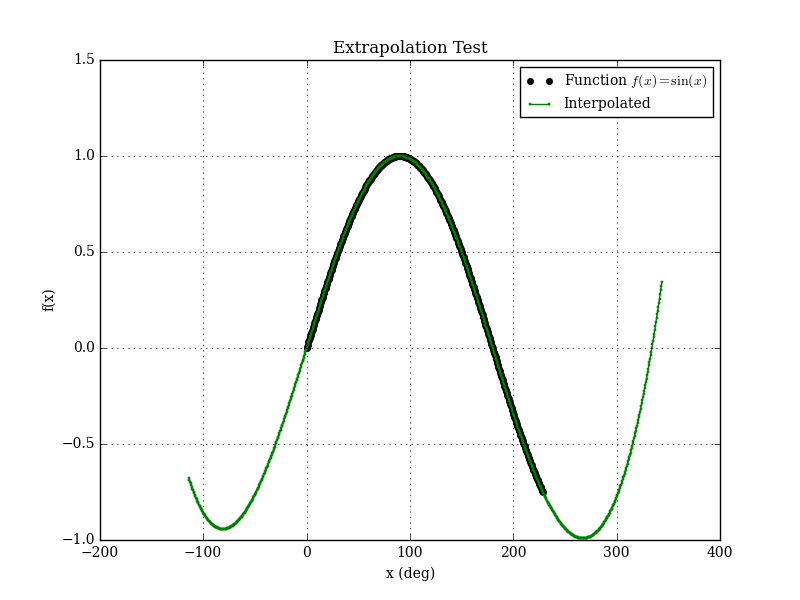
A minor update to Bspline-Fortran is the addition of an extrapolation mode. Formerly, if an interpolation was requested outside the bounds of the data, an error was returned. Now, the user has the option of enabling extrapolation.
See also
- D. Crockford, "Comments in JSON", Apr 30, 2012 [Google Plus]
- JavaScript Object Notation (JSON) Pointer, RFC 6901, April 2013 [IETF]
Feb 12, 2017
The lowly CSV (comma-separated values) file never gets any respect. Sure, it isn't really standardized, but it is a very useful text file format for columns of data, and is frequently encountered in science/engineering fields. Of course, there is no good modern Fortran library for reading and writing CSV files (see [1-2] for some older Fortran 90 code for writing only). Searching the internet (e.g., [3-4]) you will find various ad hoc suggestions for handling these files. It's amazing how little Fortran users expect their language to support non-numerical algorithms. No Fortran programmer would ever suggest that someone roll their own matrix inverse routine, but they don't see anything wrong with having to write their own data file parser (if you told a Python user they had to write their own CSV parser, you'd be laughed out of the place).
So, I created fortran-csv-module (now available on GitHub), a modern Fortran library for reading and writing CSV files. Everything is handled by an object-oriented csv_file class. Here is an example for writing a file:
program csv_write_test

use csv_module
use iso_fortran_env, only: wp => real64

implicit none

type(csv_file) :: f
logical :: status_ok

! open the file
call f%open('test.csv',n_cols=4,status_ok=status_ok)

! add header
call f%add(['x','y','z','t'])
call f%next_row()

! add some data:
call f%add([1.0_wp,2.0_wp,3.0_wp],real_fmt='(F5.3)')
call f%add(.true.)
call f%next_row()
call f%add([4.0_wp,5.0_wp,6.0_wp],real_fmt='(F5.3)')
call f%add(.false.)
call f%next_row()

! finished
call f%close(status_ok)

end program csv_write_test
Which produces the following file:
x,y,z,t 1.000,2.000,3.000,T 4.000,5.000,6.000,F
Real, integer, logical, or character data can be added as scalars, vectors, and matrices.
When reading a CSV file, the data is stored internally in the class as allocatable character strings, which can be retrieved as real, integer, logical or character vectors as necessary. For example, to get the x, y, z, and t vectors from the previously-generated file:
program csv_read_test

use csv_module
use iso_fortran_env, only: wp => real64

implicit none

type(csv_file) :: f
character(len=30),dimension(:),allocatable :: header
real(wp),dimension(:),allocatable :: x,y,z
logical,dimension(:),allocatable :: t
logical :: status_ok
integer,dimension(:),allocatable :: itypes

! read the file
call f%read('test.csv',header_row=1,status_ok=status_ok)

! get the header and type info
call f%get_header(header,status_ok)
call f%variable_types(itypes,status_ok)

! get some data
call f%get(1,x,status_ok)
call f%get(2,y,status_ok)
call f%get(3,z,status_ok)
call f%get(4,t,status_ok)

! destroy the file
call f%destroy()

end program csv_read_test
Various options are user-selectable for specifying the format (e.g., changing the quote or delimiter characters). You can choose to enclose strings (or all fields) in quotes or not. The library works pretty well, and there are probably additional improvements that could be made. For one thing, it doesn't properly handle the case of a string that contains the delimiter character (I'll eventually fix this). If anybody has any other improvements, fork it and send me a pull request. The license is BSD, so you can use it for whatever you want.
See also
- J. Burkardt, CSV_IO -- Read and Write Comma Separated Values (CSV) Files. [note: it doesn't actually contain any CSV reading capability]
- A. Markus, FLIBS -- Includes a csv_file module for writing CSV files.
- How to read a general csv file [Intel Fortran Forum]
- Read data from a .csv file in fortran [Stack Overflow]
Oct 29, 2016
For a number of years I have been familiar with the observation that the quality of programmers is a decreasing function of the density of go to statements in the programs they produce. -- Edsger W. Dijkstra
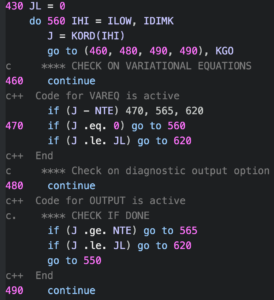
One of the classics of computer science is Edsger Dijkstra's "Go To Statement Considered Harmful", written in 1968. This missive argued that the GOTO statement (present in several languages at the time, including Fortran) was too primitive for high-level programming languages, and should be avoided.
Most people now agree with this, although some even today think that GOTOs are fine under some circumstances. They are present in C and C++, and are apparently used extensively in the Linux kernel. A recent study of C code in GitHub concluded that GOTO use is not that bad and is mainly used for error-handling and cleanup tasks, for situations where there are no better alternatives in C. However, C being a low-level language, we should not expect much from it. For modern Fortran users however, there are better ways to do these things. For example, unlike in C, breaking out of multiple loops is possible without GOTOs by using named DO loops with an EXIT statement like so:
a_loop : do a=1,n
    b_loop: do b=1,m
        !do some stuff ...
        if (done) exit a_loop ! break out of the outer loop
        !...
    end do b_loop
end do a_loop
In old-school Fortran (or C) this would be something like this:
do a=1,n
    do b=1,m
        ! do some stuff ...
        if (done) goto 10 ! break out of the outer loop
        ! ...
    end do
end do
10 continue
Of course, these two simple examples are both functionally equivalent, but the first one uses a much more structured approach. It's also a lot easier to follow what is going on. Once a line number is declared, there's nothing to stop a GOTO statement from anywhere in the code from jumping there (see spaghetti code). In my view, it's best to avoid this possibility entirely. In modern Fortran, DO loops (with CYCLE and EXIT), SELECT CASE statements, and other language constructs have obviated the need for GOTO for quite some time. Fortran 2008 added the BLOCK construct which was probably the final nail in the GOTO coffin, since it allows for the most common use cases (exception handing and cleanup) to be easily done without GOTOs. For example, in this code snippet, the main algorithm is contained within a BLOCK, and the exception handling code is outside:
main: block
    ! do some stuff ...
    if (error) exit main ! if there is a problem anywhere in this block,
    ! then exit to the exception handling code.
    ! ...
    return ! if everything is OK, then return
end block main

! exception handling code here
The cleanup case is similar (which is code that is always called):
main: block
    ! do some stuff ...
    if (need_to_cleanup) exit main ! for cleanup
    ! ...
end block main

! cleanup code here
I don't believe any of the new programming languages that have cropped up in the past couple of decades has included a GOTO statement (although someone did create a goto statement for Python as an April Fool's joke in 2004). Of course, the presence of GOTO's doesn't mean the programmer is bad or that the code isn't going to work well. There is a ton of legacy Fortran 77 code out there that is rock solid, but unfortunately littered with GOTOs. An example is the DIVA integrator from the JPL MATH77 library (the screenshot above is from this code). First written in 1987, it is code of the highest quality, and has been used for decades in many spacecraft applications. However, it is also spaghetti code of the highest order, and seems like it would be unimaginably hard to maintain or modify at this point.
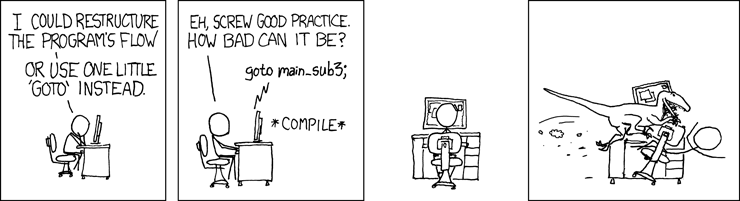
Source: XKCD
See also
- E. W. Dijkstra, "Go To Statement Considered Harmful", Communications of the ACM, Vol. 11, No. 3, March 1968, pp. 147-148 [online version here]
- E. A. Meyer, "Considered Harmful" Essays Considered Harmful, December 28, 2002.
- M. Nagappan, et. al, "An Empirical Study of Goto in C Code from GitHub Repositories", Proceedings of the 2015 10th Joint Meeting on Foundations of Software Engineering, Pages 404-414
- Using GOTO in Linux Kernel Code, January 13, 2003,
Oct 15, 2016
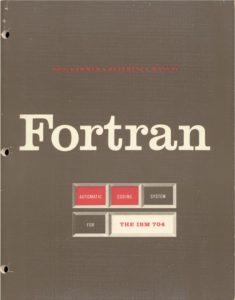
Today marks the 60th anniversary of the release of the original Fortran Programmer's Reference Manual. Fortran was the world's first high-level computer programming language, was developed beginning in 1953 at IBM by a team lead by John Backus. The first compiler was released in 1957. According to the manual, one of the main features was:
Object programs produced by FORTRAN will be nearly as efficient as those written by good programmers.
The first Fortran compiler (which was also the first optimizing compiler) was named one of the top 10 algorithms of the 20th century:
The creation of Fortran may rank as the single most important event in the history of computer programming: Finally, scientists (and others) could tell the computer what they wanted it to do, without having to descend into the netherworld of machine code. Although modest by modern compiler standards—Fortran I consisted of a mere 23,500 assembly-language instructions—the early compiler was nonetheless capable of surprisingly sophisticated computations. As Backus himself recalls in a recent history of Fortran I, II, and III, published in 1998 in the IEEE Annals of the History of Computing, the compiler "produced code of such efficiency that its output would startle the programmers who studied it."
The entire manual was only 51 pages long. Fortran has evolved significantly since the 1950s, and the descendant of this fairly simple language continues to be used today. The most recent version of the language (a 603 page ISO standard) was published in 2010.
See also
- John W. Backus, New York Times obituary, March 20, 2007.
- J. Backus, "The History of FORTRAN I, II, and III", ACM SIGPLAN Notices - Special issue: History of programming languages conference, Volume 13 Issue 8, August 1978, Pages 165 - 180.
Sep 20, 2016
"Perfection is achieved, not when there is nothing more to add, but when there is nothing left to take away." -- Antoine de Saint-Exupéry

The Fortran standards committee generally refuses to break backward compatibility when Fortran is updated. This is a good thing (take that, Python), and code written decades ago can still be compiled fine today. However, over the years, various old features of the language have been identified as "obsolescent", namely:
- Alternate return
- Assumed-length character functions
CHARACTER*(*) form of CHARACTER declaration- Computed
GO TO statement
DATA statements among executable statements- Fixed source form
- Statement functions
ENTRY statement- Labeled
DO loops [will be obsolescent in Fortran 2015]
EQUIVALENCE [will be obsolescent in Fortran 2015]COMMON Blocks [will be obsolescent in Fortran 2015]BLOCK DATA [will be obsolescent in Fortran 2015]
And a small set of features has actually been deleted from the language standard:
ASSIGN and assigned GO TO statements- Assigned
FORMAT specifier
- Branching to an
END IF statement from outside its IF block
H edit descriptorPAUSE statement- Real and double precision
DO control variables and DO loop control expressions
- Arithmetic
IF [will be deleted in Fortran 2015]
- Shared
DO termination and termination on a statement other than END DO or CONTINUE [will be deleted in Fortran 2015]
In practice, all compilers still support all the old features (although special compiler flags may be necessary to use them). Normally, you shouldn't use any of this junk in new code. But there is still a lot of legacy FORTRAN 77 code out there that people want (or need) to compile. However, as I've shown many times in this blog, updating old Fortran code to modern standards is not really that big of a deal.
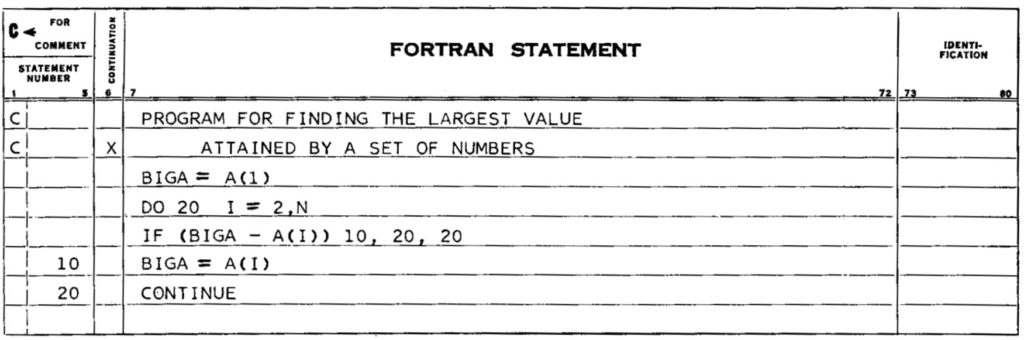
Fortran example from the 1956 Fortran programmer's reference manual. It contains two obsolescent (fixed form source and a labeled DO loop) and one deleted Fortran feature (Arithmetic IF). This entire example could be replaced with biga = maxval(a) in modern Fortran.
When the next revision of the language (Fortran 2015) is published, it will mark the first time since Fortran was first standardized in 1966 that we will have two consecutive minor revisions of the language (2008 was also a minor revision). The last major revision of the language was Fortran 2003 over a decade ago. There still is no feature-complete free Fortran 2003 compiler (although gfortran currently does include almost all of the Fortran 2003 standard).
Personally, I would tend to prefer a faster-paced cycle of Fortran language development. I'm not one of those who think the language should include regular expressions or a 2D graphics API (seriously, C++?). But, there are clearly potentially useful things that are missing. I think the standard should finally acknowledge the existence of the file system, and provide intrinsic routines for changing and creating directories, searching for files, etc. Currently, if you want to do anything like that you have to resort to system calls or non-standard extensions provided by your compiler vender (thus making the code less portable). A much more significant upgrade would be better support for generic programming (maybe we'll get that in Fortran 2025). There are also many other feature proposals out there (see references below).
See also
- Fortran Feature Proposals – at the Fortran Wiki.
- E. Myklebust, Feature Proposals for Fortran – The Complete Set, ISO/IEC JTC1/SC22/WG5 N1972
- C. Page, "Suggestion: Improved String-handling in Fortran", October 1, 2015.
- V. Snyder, "Units of Measure in Fortran", N1970, April 22, 2013.
- S. Lionel, "The Future of Fortran", March 27, 2015
Sep 11, 2016
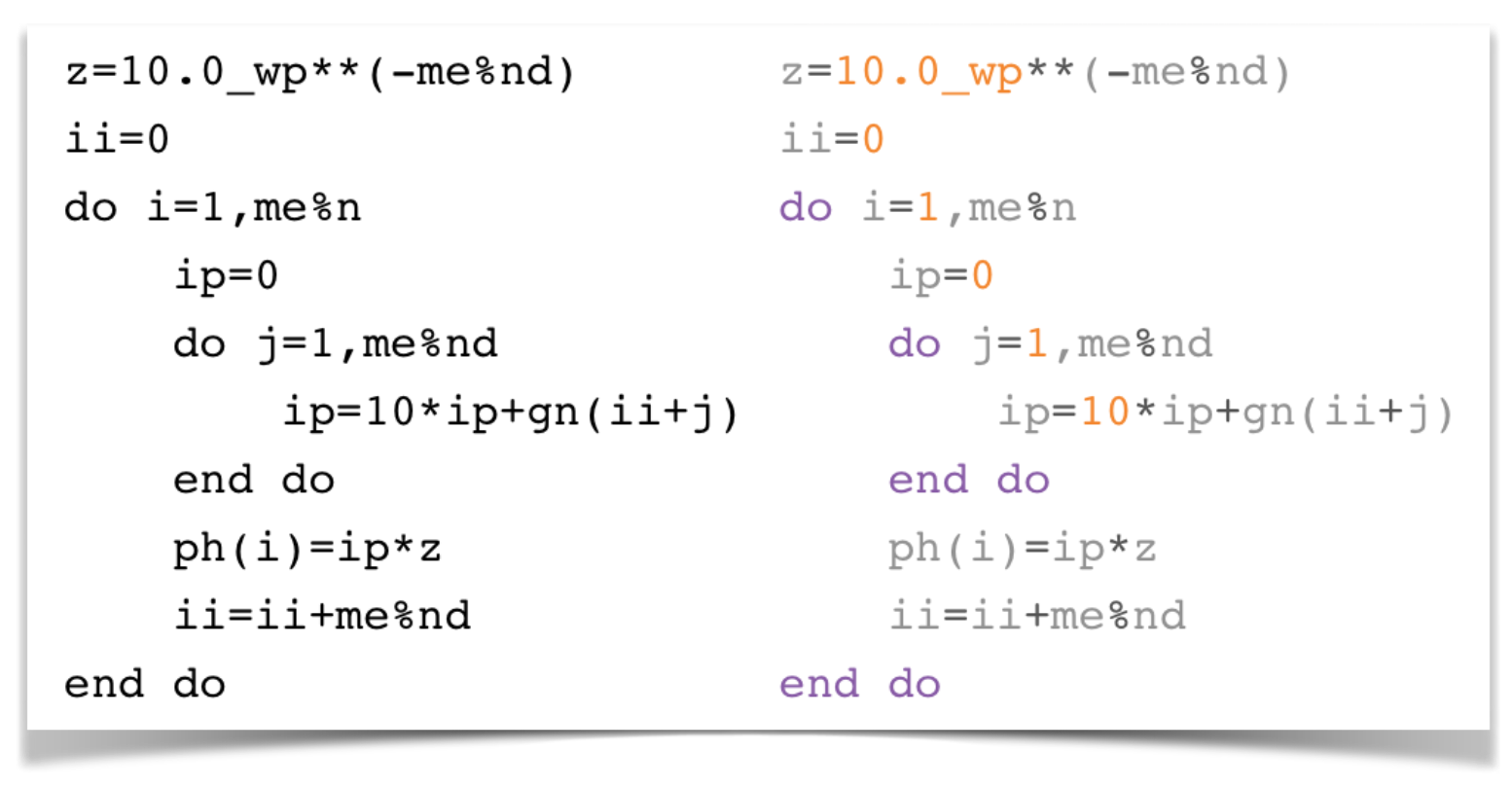
Decently syntax highlighted Fortran code on the internet is hard to come by. None of the major sites where people are likely to visit to learn about Fortran have it:
- The Google Groups hosting of comp.lang.fortran (I don't really expect much from this one since it's just Usenet.)
- Stack Overflow (we should expect better from them, since they have had syntax highlighting for many other languages for years.) It looks like they are using Google's code-prettify (which seems to have a pull request ready to provide syntax highlighting for Fortran, so perhaps there is hope?)
- Intel Fortran compiler documentation [example] (people pay good money for this compiler, and so should ask for better documentation).
- GFortran documentation (their entire Fortran website looks like it is from the late 1990s, and could certainly use an overhaul).
Luckily GitHub has syntax highlighting for Fortran, as well as the Fortran Wiki.
Personally, I hate looking at non-syntax highlighted code. It's not aesthetically pleasing and I find it hard to read. On this blog, I'm using a Fortran plugin for SyntaxHighlighter Evolved, which I downloaded somewhere at some point and have modified to account for various newer Fortran language features. It's not perfect, but it looks pretty good.
Consider this example from the gfortran website:
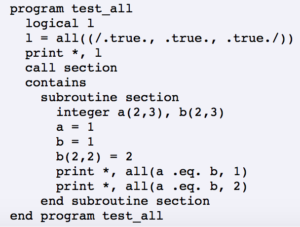
Now that looks just awful, and not just because they are using ancient syntax such as (/, /), and .eq.. Whereas the following syntax-highlighted one looks great:
program test_all

implicit none

logical :: l

l = all([.true., .true., .true.])
write(*,*) l
call section()

contains

subroutine section()

integer,dimension(2,3) :: a, b

a = 1
b = 1
b(2,2) = 2
write(*,*) all(a == b, 1)
write(*,*) all(a == b, 2)

end subroutine section

end program test_all
FORD-produced documentation has nice syntax highlighting for Fortran code provided by Pygments (which is written in Python). An example can be found here. Rouge is another code highlighter (written in Ruby) that supports Fortran and can output as HTML. Both Pygments and Rouge are open source and released under permissive licenses.
Sep 10, 2016

Intel has announced the availability of version 17.0 of the Intel Fortran Compiler (part of Intel Parallel Studio XE 2017). Slowly but surely, the compiler is approaching full support for the current Fortran 2008 standard. New Fortran 2008 features added in this release are:
TYPE(intrinsic-type)- Pointer initialization
- Implied-shape
PARAMETER arrays
- Extend
EXIT statement to all valid construct names
- Support
BIND(C) in internal procedures
In addition, the compiler now also supports the standard auto-reallocation on assignment by default (previously, you had to use a special compiler flag to enable this behavior).
See also
Aug 27, 2016
JSON-Fortran 5.1 is out. There are several new features in this release. I added a get_path() routine that can be used to return the path of a variable in a JSON structure. This can be used along with the traverse() routine to do something pseudointeresting: convert a JSON file into a Fortran namelist file. Why would anyone want to do that, you ask? Who knows. Consider the following example:
program why

    use json_module

    implicit none

    type(json_core) :: json
    type(json_value), pointer :: p
    integer :: iunit !! file unit

    open (newunit=iunit, file='data.nml', status='REPLACE')
    write (iunit, '(A)') '&DATA'
    call json%initialize()
    call json%parse(file='data.json', p=p)
    call json%traverse(p, print_json_variable)
    write (iunit, '(A)') '/'
    close (iunit)

contains

    subroutine print_json_variable(json, p, finished)

        !! A `traverse` routine for printing out all
        !! the variables in a JSON structure.

        implicit none

        class(json_core), intent(inout) :: json
        type(json_value), pointer, intent(in) :: p
        logical(json_LK), intent(out) :: finished

        character(kind=json_CK, len=:), allocatable :: path
        character(kind=json_CK, len=:), allocatable :: value
        logical(json_LK) :: found
        type(json_value), pointer :: child
        integer(json_IK) :: var_type

        call json%get_child(p, child)
        finished = .false.

        !only print the leafs:
        if (.not. associated(child)) then
            !fortran-style:
            call json%get_path(p, path, found, &
                               use_alt_array_tokens=.true., &
                               path_sep=json_CK_'%')
            if (found) then
                call json%info(p, var_type=var_type)
                select case (var_type)
                case (json_array, json_object)
                    !an empty array or object
                    !don't print anything
                    return
                case (json_string)
                    ! note: strings are returned escaped
                    ! without quotes
                    call json%get(p, value)
                    value = '"'//value//'"'
                case default
                    ! get the value as a string
                    ! [assumes strict_type_checking=false]
                    call json%get(p, value)
                end select
                !check for errors:
                if (json%failed()) then
                    finished = .true.
                else
                    write (iunit, '(A)') &
                        path//json_CK_' = '//value//','
                end if
            else
                finished = .true.
            end if
        end if

    end subroutine print_json_variable

end program why
Here, we are simply traversing the entire JSON structure, and printing out the paths of the leaf nodes using a namelist-style syntax. For the example JSON file:
{
    "t": 0.0,
    "x": [1.0, 2.0, 3.0],
    "m": 2000.0,
    "name": "foo"
}
This program will produce the following namelist file:
&DATA
t = 0.0E+0,
x(1) = 0.1E+1,
x(2) = 0.2E+1,
x(3) = 0.3E+1,
m = 0.2E+4,
name = "foo",
/
Which could be read using the following Fortran program:
program namelist_test

use iso_fortran_env, only: wp => real64

implicit none

real(wp) :: t,m,x(3)
integer :: iunit,istat
character(len=10) :: name

! define the namelist:
namelist /DATA/ t,x,m,name

! read the namelist:
open(newunit=iunit,file='data.nml',status='OLD')
read(unit=iunit,nml=DATA,iostat=istat)
close(unit=iunit)

end program namelist_test
There is also a new minification option for printing a JSON structure with no extra whitespace. For example:
{"t":0.0E+0,"x":[0.1E+1,0.2E+1,0.3E+1],"m":0.2E+4,"name":"foo"}
See also
- f90nml -- A Python module for parsing Fortran namelist files
Aug 07, 2016
Often the need arises to add (or subtract) elements from an array on the fly. Fortran 2008 allows for this to be easily done using standard allocatable arrays. An example for integer arrays is shown here:
integer,dimension(:),allocatable :: x

x = [1,2,3]
x = [x,[4,5,6]] ! x is now [1,2,3,4,5,6]
x = x(1:4) ! x is now [1,2,3,4]
Note that, if using the Intel compiler, this behavior is not enabled by default for computational efficiency reasons. To enable it you have to use the -assume realloc_lhs compiler flag.
Resizing an array like this carries a performance penalty. When adding a new element, the compiler will likely have to make a temporary copy of the array, deallocate the original and resize it, and then copy over the original elements and the new one. A simple test case is shown here (compiled with gfortran 6.1.0 with -O3 optimization enabled):
program test

implicit none

integer,dimension(:),allocatable :: x
integer :: i

x = [0]
do i=1,100000
    x = [x,i]
end do

end program test
This requires 2.828986 seconds on my laptop (or 35,348 assignments per second). Now, that may be good enough for some applications. However, performance can be improved significantly by allocating the array in chunks, as shown in the following example, where we allocate in chunks of 100 elements, and then resize it to the correct size at the end:
program test

    implicit none

    integer, dimension(:), allocatable :: x
    integer :: i, n

    integer, parameter :: chunk_size = 100

    n = 0
    do i = 0, 100000
        call add_to(x, i, n, chunk_size, finished=i == 100000)
    end do

contains

    pure subroutine add_to(vec, val, n, chunk_size, finished)

        implicit none

        integer, dimension(:), allocatable, intent(inout) :: vec
            !! the vector to add to
        integer, intent(in) :: val
            !! the value to add
        integer, intent(inout) :: n
            !! counter for last element added to vec.
            !! must be initialized to size(vec)
            !! (or 0 if not allocated) before first call
        integer, intent(in) :: chunk_size
            !! allocate vec in blocks of this size (>0)
        logical, intent(in) :: finished
            !! set to true to return vec
            !! as its correct size (n)

        integer, dimension(:), allocatable :: tmp

        if (allocated(vec)) then
            if (n == size(vec)) then
                ! have to add another chunk:
                allocate (tmp(size(vec) + chunk_size))
                tmp(1:size(vec)) = vec
                call move_alloc(tmp, vec)
            end if
            n = n + 1
        else
            ! the first element:
            allocate (vec(chunk_size))
            n = 1
        end if

        vec(n) = val

        if (finished) then
            ! set vec to actual size (n):
            if (allocated(tmp)) deallocate (tmp)
            allocate (tmp(n))
            tmp = vec(1:n)
            call move_alloc(tmp, vec)
        end if

    end subroutine add_to

end program test
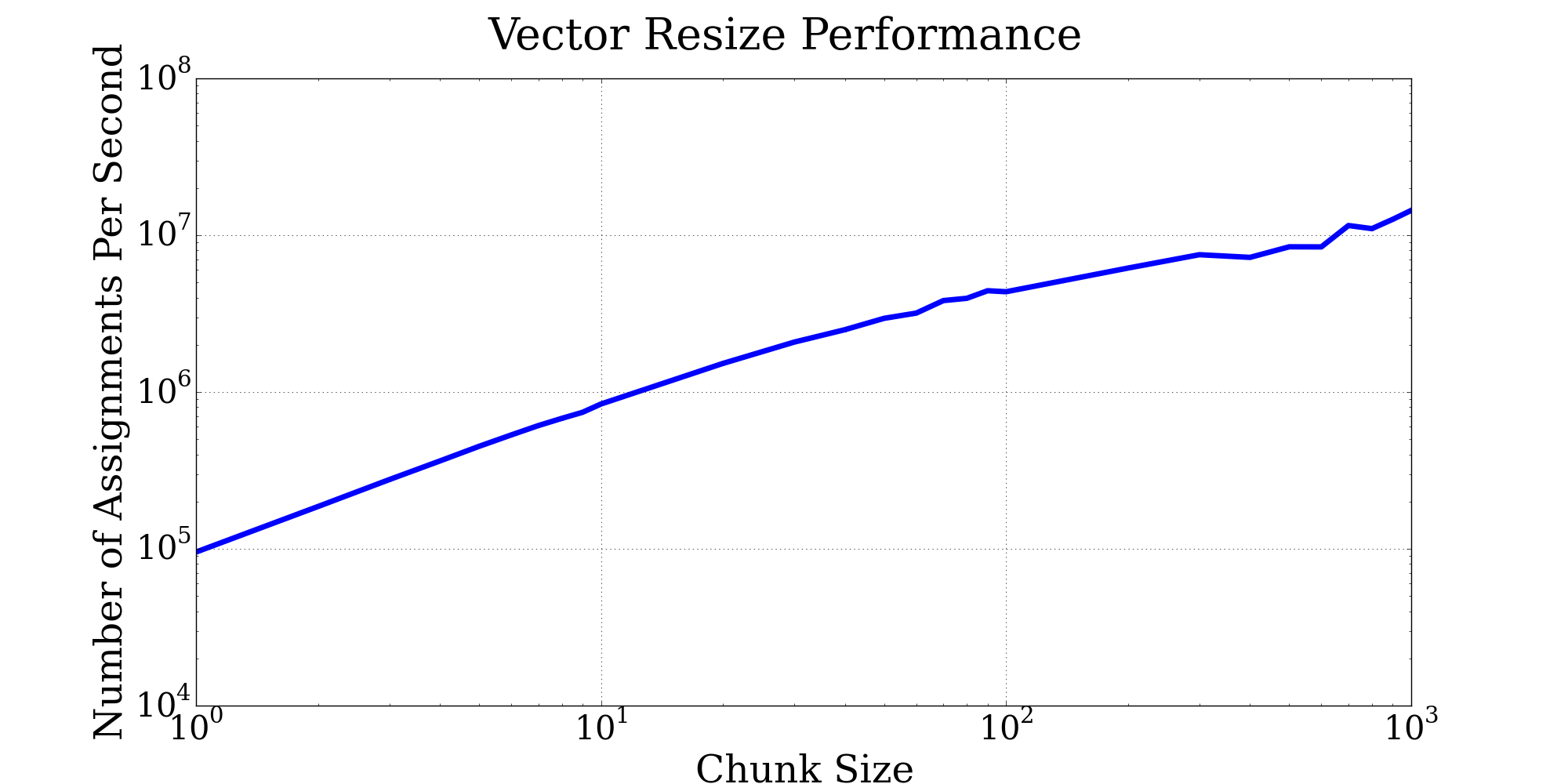
This requires only 0.022938 seconds (or 4,359,577 assignments per second) which is nearly 123 times faster. Note that we are using the Fortran 2003 move_alloc intrinsic function, which saves us an extra copy operation when the array is resized.
Increasing the chunk size can improve performance even more:
Depending on the specific application, a linked list is another option for dynamically-sized objects.